
Every successful website starts with a solid foundation, and that foundation is—Web Hosting. Whether you are building a personal portfolio or starting your first blog, finding the best budget web hosting 2026 is the biggest decision you will make.
As a professional web developer, I have designed and managed several client websites over the years. I remember a while back when I had to completely rebuild a website’s author portal and create a separate custom dashboard because a severe malware attack compromised the main pages due to weak server security. After navigating those technical challenges, one thing became very clear to me: Cheap hosting shouldn’t mean weak hosting. You need a server that is fast, secure, and fits your budget.
In this guide, I have compared the top 3 best budget web hosting companies of 2026 to help you save both time and money.
The Quick Comparison: Affordable Web Hosting Picks for 2026
| Hosting Partner | Starting Price | Key Features | Action |
|---|---|---|---|
|
Hostinger 🏆 Best Value |
₹149/mo |
LiteSpeed Servers,
Free Domain & Unlimited SSL |
|
|
SiteGround 🛡️ Premium Security |
₹249/mo |
Google Cloud Infrastructure, Advanced Caching & WAF |
|
|
Bluehost
💻 Easy Setup |
₹199/mo |
Officially Recommended by WordPress, 1-Click Install |
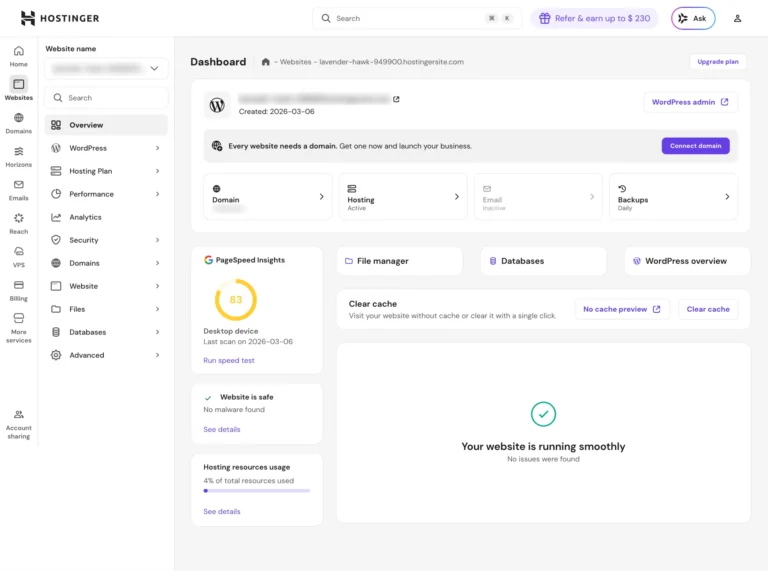
1. Hostinger: The Overall Best Budget Web Hosting 2026
If you want to launch a fast website on a limited budget, Hostinger is currently the best budget web hosting 2026 has to offer in the market. Their LiteSpeed web servers ensure that your website loads in milliseconds, which is crucial for both SEO rankings and user experience.
KEY FEATURES:
- hPanel: A modern, clean, and beginner-friendly alternative to the traditional cPanel.tform Code: It uses React Native and Expo, write once, and it works for both iPhone and Android.
- Free Domain & SSL: Includes a free domain for the first year and a lifetime free SSL certificate.
- Backups: Weekly or daily backups (depending on the plan) so your hard work is always safe.
PROS & CONS:
- Highly affordable pricing.
- Excellent global server response time.
- No direct phone support (but their 24/7 live chat is incredibly fast).
Who is this for?
Anyone starting their first blog, portfolio, or small business website who wants premium speed on a tight budget.
2. SiteGround: Top Secure & Cheap Web Hosting for Developers
If you absolutely do not want to compromise on security and speed, SiteGround is the undisputed king of the premium category. Hosted on the Google Cloud infrastructure, its performance is practically unmatched.
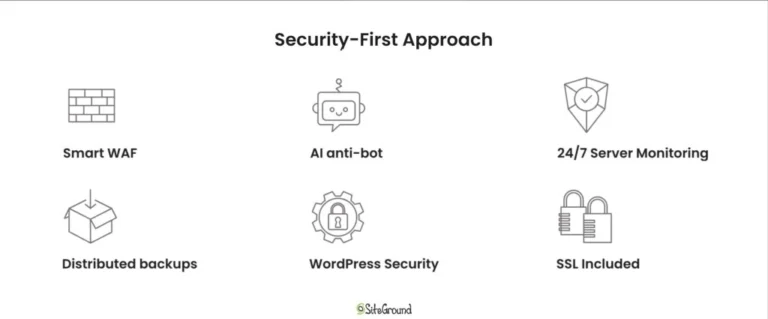
Whenever I design backend portals or custom dashboards where data privacy is a top priority, I always prefer highly secure servers. SiteGround’s server-level security and custom web application firewall (WAF) proactively block minor vulnerabilities and brute-force attacks before they even reach your site.
KEY FEATURES:
- Top-Tier Security: AI-driven anti-bot system and custom malware protection.
- SuperCacher: Their in-house caching mechanism that can boost website speed by up to 4x.
- Staging Tool: Clone your website with one click, test your new code or design changes safely, and push them live instantly.
PROS & CONS:
- The best customer support in the industry.
- Highly secure and reliable infrastructure.
- Renewal prices can be on the higher side.
Who is this for?
Websites that need to handle high traffic, or projects where security is the absolute highest priority (like e-commerce stores or custom developer projects).
3. Bluehost: Best for Direct WordPress Integration
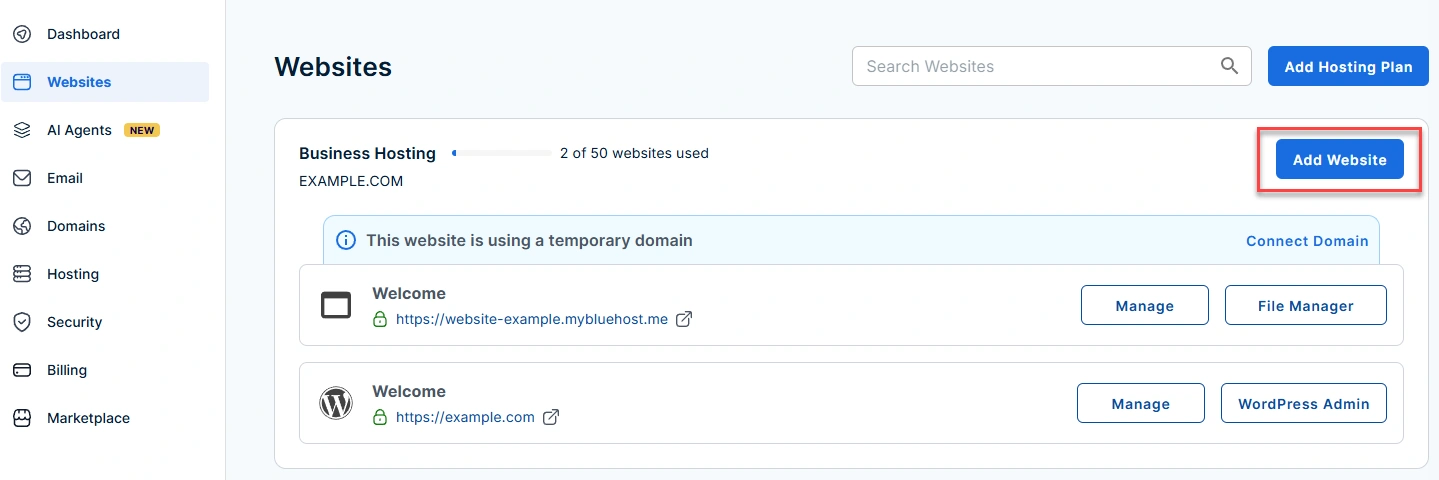
Bluehost is one of the oldest and most trusted names in the web hosting industry. It is officially recommended by WordPress.org itself. Their dashboard is so streamlined that even someone with zero technical experience can take their website live in under 10 minutes.
KEY FEATURES:
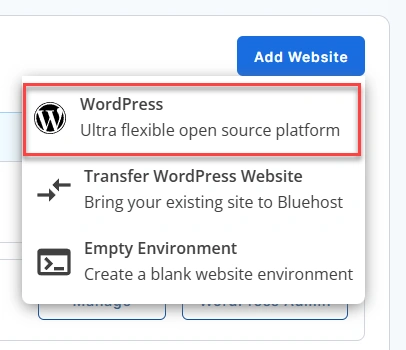
- 1-Click WordPress Install: The setup process is completely seamless.
- Free Domain & CDN: Comes with a free domain for the first year and built-in Cloudflare CDN integration.
- Custom Themes: You can install themes directly from their inbuilt marketplace.
PROS & CONS:
- Fully optimized specifically for WordPress.
- Very beginner-friendly onboarding process.
- Server response times can occasionally be slightly slower compared to Hostinger and SiteGround.
Who is this for?
Absolute beginners who want to avoid technical setups and want to launch their WordPress site as easily and quickly as possible.
Buyer’s Guide: How to Choose the Best Budget Web Hosting 2026
Before purchasing hosting, as a web developer, I always evaluate these 3 critical metrics:
- Uptime Guarantee: Your website needs to be live 24/7. Always choose a host that offers a 99.9% uptime guarantee. If the server goes down, you lose traffic, credibility, and revenue.
- Security Features: Malware and hacking attempts are very common on the internet. Make sure your hosting company provides a free SSL certificate, basic firewalls, and automated backups to ensure your content is always safe.
- Scalability: Your website might be small today, but as your traffic grows in the future, the server should easily upgrade to handle the load without any downtime.
Final Verdict: Which Budget Hosting Should You Choose?
All three hosting providers have their unique strengths, but the final decision comes down to your specific needs:
- If you have a strict budget but still want top-tier speed, Hostinger is the smartest choice.
- If you want to avoid any technical headaches and need the easiest WordPress setup, choose Bluehost.
- But if you want premium security, world-class customer support, and the best infrastructure for custom projects, go with SiteGround without a second thought.
I hope this guide helped you find the best budget web hosting 2026 for your new website project. Which hosting are you choosing? Let me know in the comments below!Which hosting are you choosing for your new website project? Let me know in the comments below!
Disclaimer: This post is reader-supported. If you make a purchase through the links in this article, I may earn a small commission at no extra cost to you. I only recommend tools that I have personally tested and fully trust.